
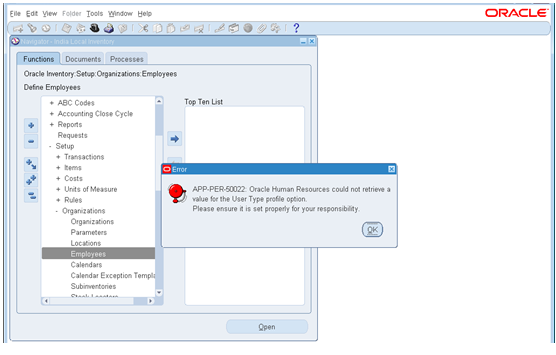
Error: - APP-PER-50022: Oracle Human Resource Could Not Retrieve a Value For The User Type Profile Option. Please ensure it is set property for your responsibility



Error: - APP-PER-50022: Oracle Human Resource Could Not Retrieve a Value For The User Type Profile Option. Please ensure it is set the property for your responsibility.


Solution-:
     (1)  Go to System administrator > Profile > System


    (2) Now Search “HR: User Type” Profile option at Responsibility level with Respective Responsibility.


And Click On FIND Button.


Now Select HR: User Type Value “HR with Payroll User” (you can choose another option as well accordingly).


And SAVE.
Now check your responsibility, error removed.
Go ahead with your next step and enjoy Oracle Apps.


For More Information Visit on www.OracleAppsGuide.com Or Subscribe your email-id on OracleAppsGuide.

Comments

  1. One thing is that if you find yourself searching for a student loan you may find that you’ll want a co-signer. There are many circumstances where this is correct because you will find that you do not use a past history of credit so the mortgage lender will require that you’ve got someone cosign the borrowed funds for you. Good post. https://www.avantushr.com/

    ReplyDelete
  2. I just couldn't leave your website before telling you that I truly enjoyed the top quality info you present to your visitors? Will be back again frequently to check up on new posts. Hot Desking

    ReplyDelete
  3. I am happy to find your distinguished way of writing the post. Now you make it easy for me to understand and implement the concept. Thank you for the post. singapore hr company

    ReplyDelete

Post a Comment

Popular posts from this blog

Error "You have exceeded the transaction quantity". Precision Restriction for Quantity Field Up To 6 Decimal Places Performing Lot Receipts (Doc ID 464983.1)

Error "You have exceeded the transaction quantity".  Applies to:  Information in this document applies to any platform. FORM:RCVRCERC.FMB - Enter Receipts GUI FORM:RCVTXERT.FMB - Enter Receiving Transactions GUI FORM:RCVTXERE.FMB - Enter Returns GUI FORM:RCVTXECO.FMB - Enter Corrections GUI "You have exceeded the transaction quantity" Symptoms: "You have exceeded the transaction quantity" Note: Internal error message may indicate this message: INV_QUANTITY_TOO_BIG Steps: Go to Receiving Screen Enter the qty like 7200.00000489 (6 digits restriction makes it 7200.000005) Go to Lot/Serial form Enter lot number and qty as 7200.00001 (which was rounded to 5 digits) The message "you have exceeded the transaction quantity " Cause Can Be-: a) Restriction of precision support up to 6 decimal places was added for the quantity field  b) Comparing the transaction qty entered in receiving forms and the lot quantity entered in lot-entry form after rounding to...

Script to insert on hand quantity in to MTL_TRANSACTIONS_INTERFACE

Script to insert on hand  quantity   into MTL_TRANSACTIONS_INTERFACE To insert on hand  quantity    into  MTL_TRANSACTIONS_INTERFACE INSERT INTO MTL_TRANSACTIONS_INTERFACE                             (     TRANSACTION_INTERFACE_ID,                    SOURCE_CODE,                             SOURCE_LINE_ID,                             SOURCE_HEADER_ID,                             PROCESS_FLAG,                             VALIDATION_REQUIRED,                             TRANSACTI...